
.webp?width=300&name=1%20(1).webp)
Optimizing Work Execution in Zone 1 With an Explosion Proof iPad
Most work order, inspection, and reporting systems were built for desktop environments. Moving those processes into the field involves more than installing an app on a mobile device. The software may be perfectly capable, but when the hardware interface is poorly matched to the task, the digital workflow breaks down at the point where it matters most, which is the moment of execution.
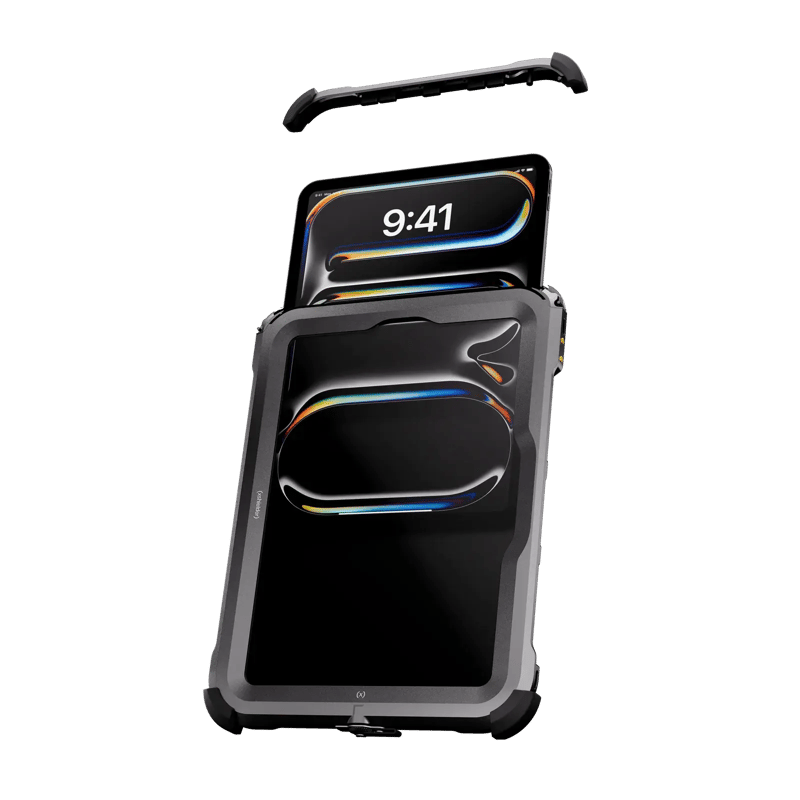
An explosion proof iPad such as the Xshielder iPad Pro 11 inch gives field technicians a screen that fits the structure of their work instead of compressing it to fit a phone.
What Field Execution in Zone 1 Actually Looks Like
Zone 1 environments are not controlled workspaces. Technicians work around heavy machinery, in high noise conditions, often in restricted access areas, and almost always in full personal protective equipment. Those conditions shape how a device gets used.
A technician completing a safety-critical inspection under time pressure needs hardware that responds without friction. Navigating a digital interface while wearing gloves, in poor lighting, with a complex checklist open, calls for a screen that is clear, responsive, and large enough to show the full task structure at once.
Where hardware ignores those physical realities, adoption falls away. Workers revert to paper notes because paper is faster, and the digital record becomes a retrospective transcription rather than a contemporaneous one.
Matching the Device to the Task
Not every field task calls for a tablet. Smartphones, and recent iPhones in particular, suit rapid communication, quick photo capture, and high-mobility work where pocketability counts. Almost all technicians carry intrinsically safe phones for exactly these situations, and for most daily tasks a phone is the right tool. Improvements in camera quality and display brightness across recent iPhone generations matter here as well, since a defect captured clearly at the asset is worth more than an image that has to be taken again.
The balance shifts when a workflow involves structured checklists, dense data entry, or the review of technical documentation such as complex engineering drawings. On a phone, multi-field forms mean navigating deep menu layers and completing one section at a time. A technician filling in an inspection record on a small screen cannot easily see which sections are complete, which are flagged, or how the current field relates to what came before it.
An ex proof tablet changes this, because the full scope of the task stays visible at once. A technician can see the entire work order, track progress across it, and catch dependencies or conflicts between fields without switching views. An 11 inch display also holds more than one application in view, so a checklist and a reference document can sit side by side rather than competing for the same screen. That is a structural difference in how the work gets done rather than a matter of screen preference.
The iPad Pro as a Field Workstation
The 11-inch iPad Pro running the M5 chip is capable of handling the enterprise applications that industrial operations actually run. IBM Maximo, SAP Plant Maintenance, and comparable EAM platforms are demanding environments. On older intrinsically safe hardware, these applications can be slow to load, sluggish between screens, and prone to timing out on poor connections. Apple's M5 and M4 processors remove much of that friction and keep technicians in the workflow rather than waiting for it to catch up with them.
Capture belongs in the same picture. The Pro camera system with LiDAR records 12MP stills and 4K video, so an inspection note, a defect image, and the record it belongs to are produced on one device instead of three.
Authentication deserves the same attention. Face ID matters in the field because a technician with dirty or gloved hands cannot reliably enter a passcode, so any protective housing needs to keep the front sensor array usable rather than obstruct it. Authentication that fails at the point of use is more than a minor inconvenience, since it interrupts the task and introduces a reason to skip the digital record entirely.
Weight is the other practical factor. Legacy hazardous area tablets tend to be heavy, and that difference accumulates across a long shift. Hardware fatigue has a real influence on whether a device gets used consistently or left at the start of the shift and collected at the end.
Gloves, Vibration, and Input Accuracy
Gloves, vibration, and physical exertion all degrade touch input accuracy. Standard capacitive screens are calibrated for bare fingertips, and even light industrial gloves introduce enough interference to make precise input difficult. On a small screen with small touch targets, that produces input errors which may not surface until a review stage, if they surface at all.
A larger display means larger interactive elements. Buttons, fields, and confirmation prompts are easier to hit accurately when wearing gloves, and the wider layout gives the interface room to space those elements sensibly rather than compressing them. When a device is easy to use under field conditions, workers use it. When it is not, they find workarounds that undermine the integrity of the digital system.
Compliance, ALCOA+, and the Point of Capture
In oil and gas, chemical processing, and other regulated industries, the quality of a digital record is a regulatory concern as much as an operational one. Data integrity frameworks, most commonly expressed through the ALCOA+ principles, require records to be attributable, legible, contemporaneous, original, and accurate. The contemporaneous requirement is where hardware bears most directly on compliance, since data should be recorded at the moment of the task rather than reconstructed from memory or paper notes afterward.
Where a device is difficult to use in the field, contemporaneous recording breaks down. Technicians complete the physical task and intend to record it digitally later. Later becomes end of shift. End of shift becomes a best-effort reconstruction that no longer meets the standard of an original record.
Permit to Work as a Worked Example
A Permit to Work is a concrete example of where this matters. These documents define the hazards present, the controls in place, and the conditions under which work may proceed. A technician reviewing a Permit to Work on a phone screen cannot easily hold the full document in view. They may miss a control condition, misread a scope boundary, or proceed on an incomplete understanding of the permit. The same document on an iPad can be read in full, without scrolling through disconnected sections, at the point where the decision is being made.
The hardware choice at the point of capture shapes the quality of the record at the point of audit.
Bringing an iPad Into a Zone 1 Environment
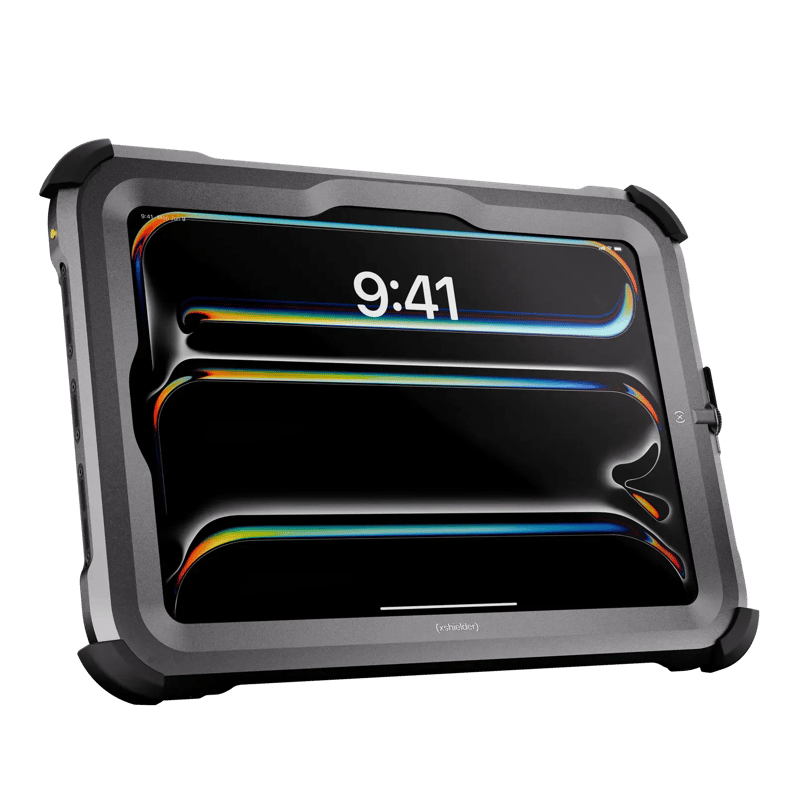
An iPad is not certified for hazardous areas on its own, so any Zone 1 deployment depends on certified protection around it. Two approaches are used in this market. Intrinsic safety limits the electrical and thermal energy available inside the device so that it cannot ignite the atmosphere, while an explosion-proof enclosure accepts that ignition may occur inside and contains it in a housing built to withstand the pressure and stop flame reaching the surrounding atmosphere. Both are recognized routes into Zone 1, and both reduce ignition risk rather than removing it. Our complete guide to intrinsically safe tablets and iPads works through both routes in more detail. The Xshielder iPad Pro 11 inch takes the enclosure route, leaving the tablet itself unmodified inside a protective cover, and it is the first iPad Pro built for hazardous area work.
Whichever route a site takes, the features an intrinsically safe tablet or iPad needs for Zone 1 follow from the way the work is done. For example, does touch response hold up through the housing, does the front sensor array stay usable for authentication, and is the assembled weight realistic across a full shift? Protection that preserves the device while degrading the interface returns the team to the paper workarounds the digital system was meant to replace.
There is a lifecycle argument alongside the usability one. The iPad Pro carries roughly six to seven years of iPadOS upgrades and close to nine years of security updates, so the enterprise applications your team depends on remain compatible and current, without the premature end-of-life issues that affect proprietary industrial hardware. The cover is replaceable as well, which means the iPad can be taken out for trade-in or resale at upgrade time rather than written off with the housing around it.
Getting the Rest of the Field Toolkit Right
Field execution rarely runs on a single device. The Xshielder iPad Pro 11 inch covers the structured side of the work, the checklists, permits and drawings that need a full-size screen, while the phone in the technician's pocket stays the tool that gets picked up most often. Xshielder's ATEX-certified explosion-proof covers for the iPhone 17 Pro Max, iPhone 17, and iPhone 16 Pro Max keep current Apple hardware working in hazardous areas, with the camera and display quality that field reporting depends on. Get in touch to talk through what your teams carry and where the gaps are.
Frequently Asked Questions
Can you use a standard iPad in a Zone 1 hazardous area?
No. An iPad has no hazardous area certification of its own, so it can only be used in Zone 1 inside a certified protective enclosure suitable for that zone and gas group. The Xshielder iPad Pro 11 inch is built for that purpose.
What is the difference between an intrinsically safe tablet and an explosion-proof tablet?
An intrinsically safe tablet limits the internal electrical and thermal energy available so that it cannot ignite the atmosphere, while an explosion-proof design contains any ignition inside a housing built to stop flame escaping.
Why use an intrinsically safe iPad instead of a phone for Zone 1 inspections?
A tablet shows the whole inspection or work order at once, so technicians can see which sections are complete or flagged instead of working through multi-field forms one screen at a time.
How do technicians unlock a device in Zone 1 while wearing gloves?
Face ID avoids the passcode problem entirely, provided the protective housing keeps the front sensor array clear, which matters when hands are gloved or contaminated.
How does tablet hardware affect ALCOA+ data integrity compliance?
Hardware that is awkward to use in the field pushes technicians into recording data after the fact, which undermines the contemporaneous and original requirements of ALCOA+.
Which enterprise maintenance apps run on an iPad in hazardous areas?
EAM platforms such as IBM Maximo and SAP Plant Maintenance run on iPadOS, and the M5-generation iPad Pro has the performance headroom to move between their screens without stalling.