

2026 Guide to Intrinsically Safe Tablets & iPads
The intrinsically safe tablet market has a hardware problem. The devices certified for Zone 1 are rugged, dependable and well proven, but they run on mid-range Android hardware with 8-inch screens specified for a generation of field work that has since moved on. Meanwhile, the tablets that your technicians want and know how to use carry no hazardous area rating at all.
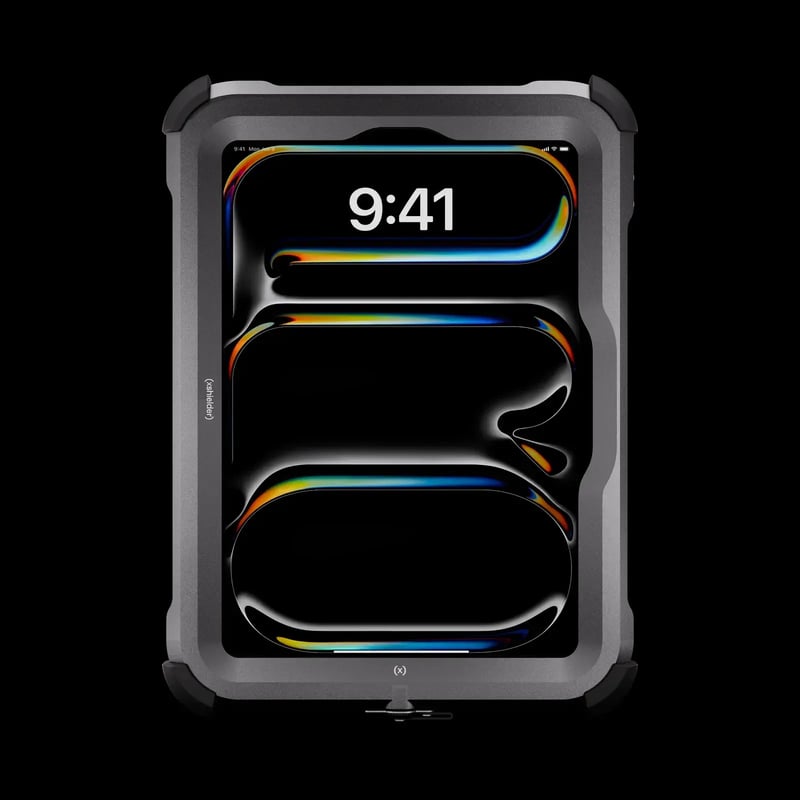
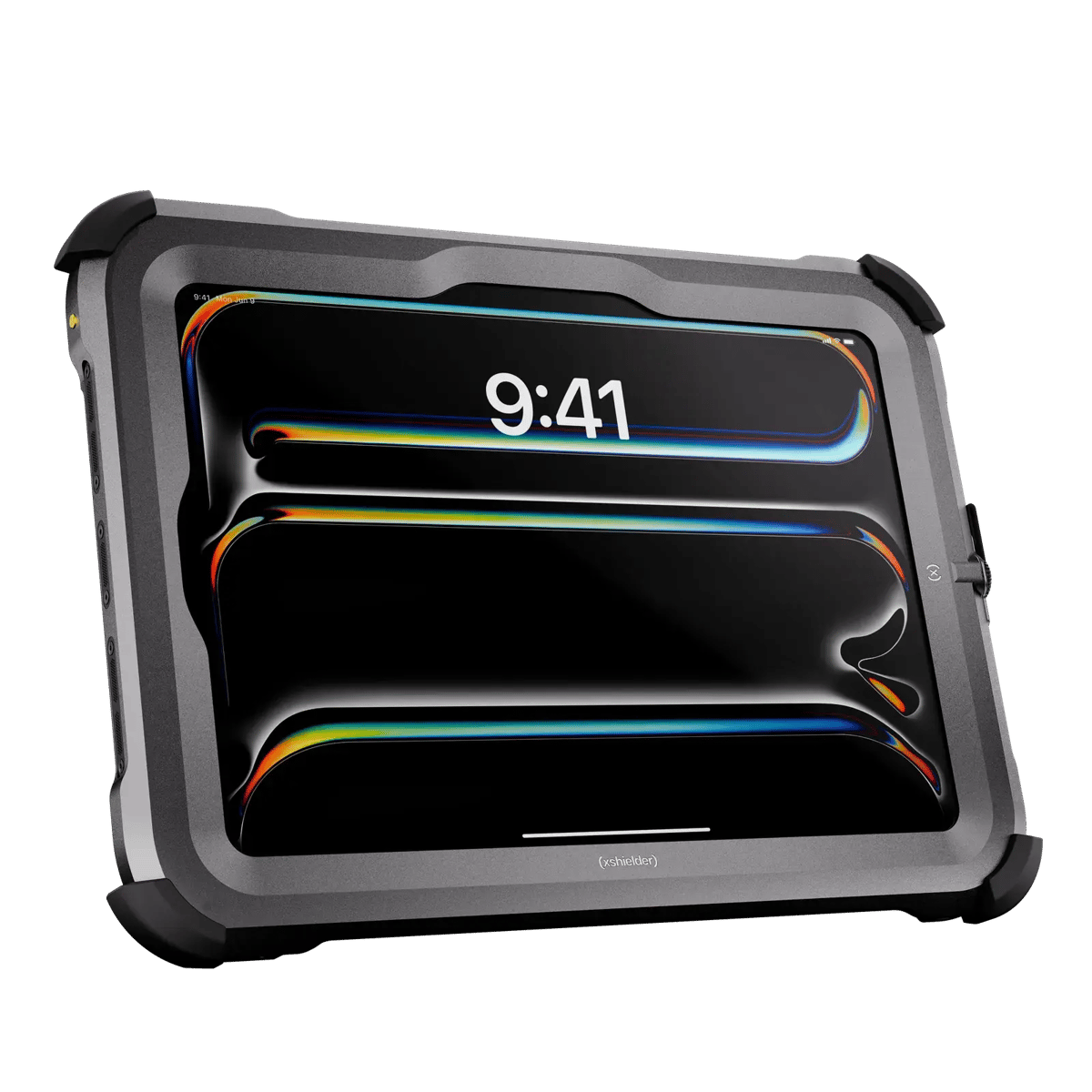
That leaves a real question for anyone specifying field hardware. What could an iPad Pro actually achieve in a Zone 1 area, what would a certified enclosure have to achieve for it to get there, and how would either compare with the dedicated intrinsically safe tablet you would otherwise buy? The Xshielder iPad Pro 11 inch is the first iPad Pro built for hazardous area work, so those questions now have a concrete answer rather than a theoretical one.
This guide covers how Zone 1 certification works and what it applies to, why tablet specification matters more than it did five years ago, how the iPad performs against the workflows that dominate hazardous area field work, and what to require of any enclosure claiming to take a consumer tablet into a hazardous area.
Understanding ATEX Zone 1 and Explosion-Proof Certification
What is a Zone 1 hazardous area?
Hazardous areas are classified by how often an explosive atmosphere is likely to be present. Zone 1 covers places where an explosive gas, vapor or mist atmosphere is likely to occur occasionally in normal operation, which means the risk belongs to how the plant runs and not to a fault condition.
Typical Zone 1 locations include offshore oil platforms, refinery process areas, chemical processing plants, terminals handling volatile hydrocarbons, pharmaceutical manufacturing environments, and paint and coating facilities.
Zone 0 sits above it on the severity scale, covering areas where that atmosphere is present continuously, for long periods, or frequently. Zone 2 sits below, covering areas where it is not likely to occur in normal operation and, if it does, persists only for a short period. The ATEX Directive uses these classifications to set the equipment protection standards that apply in each zone, and Zone 1 requires Category 2 equipment.
We explain these zones in more detail in our blog on understanding ATEX zones.
What ATEX certification actually means
ATEX is the European Union's regulatory framework for equipment intended for use in explosive atmospheres, derived from two EU directives covering equipment and workplaces. Equipment placed on the market under ATEX has been assessed against the Directive's essential health and safety requirements for its category, and for Zone 1 equipment that assessment involves a notified body.
Two protection concepts are relevant to mobile devices, and they take opposite approaches. Intrinsic safety, marked ia or ib, limits the electrical and thermal energy available inside the device so the energy present is too low to ignite the surrounding atmosphere, even under fault conditions. Explosion-proof or flameproof construction, marked Ex d, accepts that ignition may occur inside the housing and builds that housing to withstand the resulting pressure and stop flame reaching the atmosphere outside.
Both address the same operational concern, which is keeping mobile devices from igniting an explosive atmosphere. Many engineers searching for "intrinsically safe iPads" are really asking whether Apple hardware can be made Zone 1 capable at all, whichever protection concept delivers it. Where a tablet is used inside a certified enclosure, the certification applies to the enclosure and the device it houses as a single assessed system. A tablet on its own carries no hazardous area rating.
Take a read of our guides on ATEX vs IECEX vs NEC, for further understanding.
Why a standard iPad cannot enter Zone 1 on its own
Consumer electronics are designed without ignition risk in mind. An unprotected iPad generates static, contains components that can spark under fault conditions, and operates at energy levels that sit well outside Zone 1 entry requirements. Taking an uncertified device into a Zone 1 area is a regulatory breach and a real ignition risk.
A certified enclosure changes the calculation. Housed in a Zone 1-rated enclosure, an iPad can be used in hazardous areas with no modification to the Apple hardware, so the processing power, display and software ecosystem all remain intact. The engineering challenge is doing that without cancelling out the capabilities that made the device worth deploying, which is where the requirements set out further down this guide come in.
What an 11-inch iPad Pro Brings to Zone 1 Field Work
The limits of legacy intrinsically safe tablets
Dedicated intrinsically safe tablets have served the Zone 1 market for years and have done a reasonable job under the conditions they were designed for. The baseline expectation in hazardous area mobile technology was a device that survived the environment, and usability came second.
That trade-off held while field workflows meant basic forms, simple checklists and occasional image capture. Workloads have moved on substantially. Technicians are now expected to interact with digital twins, navigate large CAD files, run enterprise asset management platforms, work with real-time data visualization and, in some cases, overlay augmented reality onto live equipment. Our breakdown of the six features an intrinsically safe tablet needs for Zone 1 sets out where the current generation falls short against that list.
Most dedicated IS tablets are built on mid-range Android hardware. Zone 1 units generally run to 8 inches, which forces constant navigation on complex engineering documents, and processing power that is adequate for light tasks introduces lag on the applications that matter most in modern field operations.
The M5 chip and laptop-class performance in the field
The 11-inch iPad Pro runs Apple's M5 chip, with a 10-core GPU, a 16-core Neural Engine and a 9 or 10-core CPU depending on storage capacity, alongside 12GB or 16GB of unified memory. The preceding M4 generation sits close behind it. That is laptop-class compute in a device light enough to carry across a plant for a full shift.
In practice this means large CAD files that open immediately instead of loading slowly, digital twin environments that render without lag, and EDDL-based device configuration software that responds instantly instead of stalling during complex parameter updates. For technicians doing safety-critical work, the difference between a device that keeps up and one that does not is the difference between focused attention and managed frustration.
The 11-inch Tandem OLED display
Screen size carries real engineering weight. P&IDs, electrical schematics and plant layout drawings were designed to be read at scale. Compressing them onto an 8-inch screen produces the effect known as desert fog, where the technician zooms in to read a tag, loses all surrounding navigational context, then zooms back out to reorient. Every cycle consumes working memory that should be available for the engineering task itself, a problem we cover in depth in our guide to navigating complex engineering drawings on an intrinsically safe iPad.
The 11-inch iPad Pro uses a Tandem OLED panel rated at 1,000 nits standard brightness and 1,600 nits peak HDR brightness, with ProMotion adaptive refresh up to 120Hz. In direct sunlight, a daily reality on offshore decks and open process areas, the display stays readable. In low light inside enclosed plant areas it does not wash out or become tiring to read.
At 11 inches the screen is also large enough for two or three people to view at once, which has direct implications for crew briefings, toolbox talks and pre-task alignment, all of which depend on shared situational understanding. It is also enough room to keep two applications in view together, so a drawing and a work order do not have to take turns.
Face ID, iPadOS and the familiarity advantage
In Zone 1 areas gloves are standard, and entering a passcode on a touchscreen keyboard with industrial gloves is slow and error-prone. It also happens every time the device locks. Across a crew of 20 people running multiple authentication events per shift, that friction adds up to a measurable productivity loss, as we set out in our guide to optimising work execution in Zone 1.
Face ID removes the step, authenticating with a glance so that gloved hands never touch a keyboard. One limitation is worth planning around. On iPad, Face ID needs to see the mouth and nose, so crews working in respirators or other face-covering PPE will still need a passcode fallback, and that is worth testing in real PPE rather than assuming it through.
iPadOS brings a second structural advantage, which is familiarity. Hundreds of millions of people use iPads and iPhones outside of work, so most of a typical industrial workforce already knows how to navigate the operating system. Dedicated IS tablets running Android under Samsung Knox ask technicians to relearn basic navigation. Industry research consistently identifies unfamiliar interfaces as one of the primary barriers to digital tool adoption in field environments, and when a device feels like something people already use, adoption tends to happen faster and more completely.
Software ecosystem and long-term support
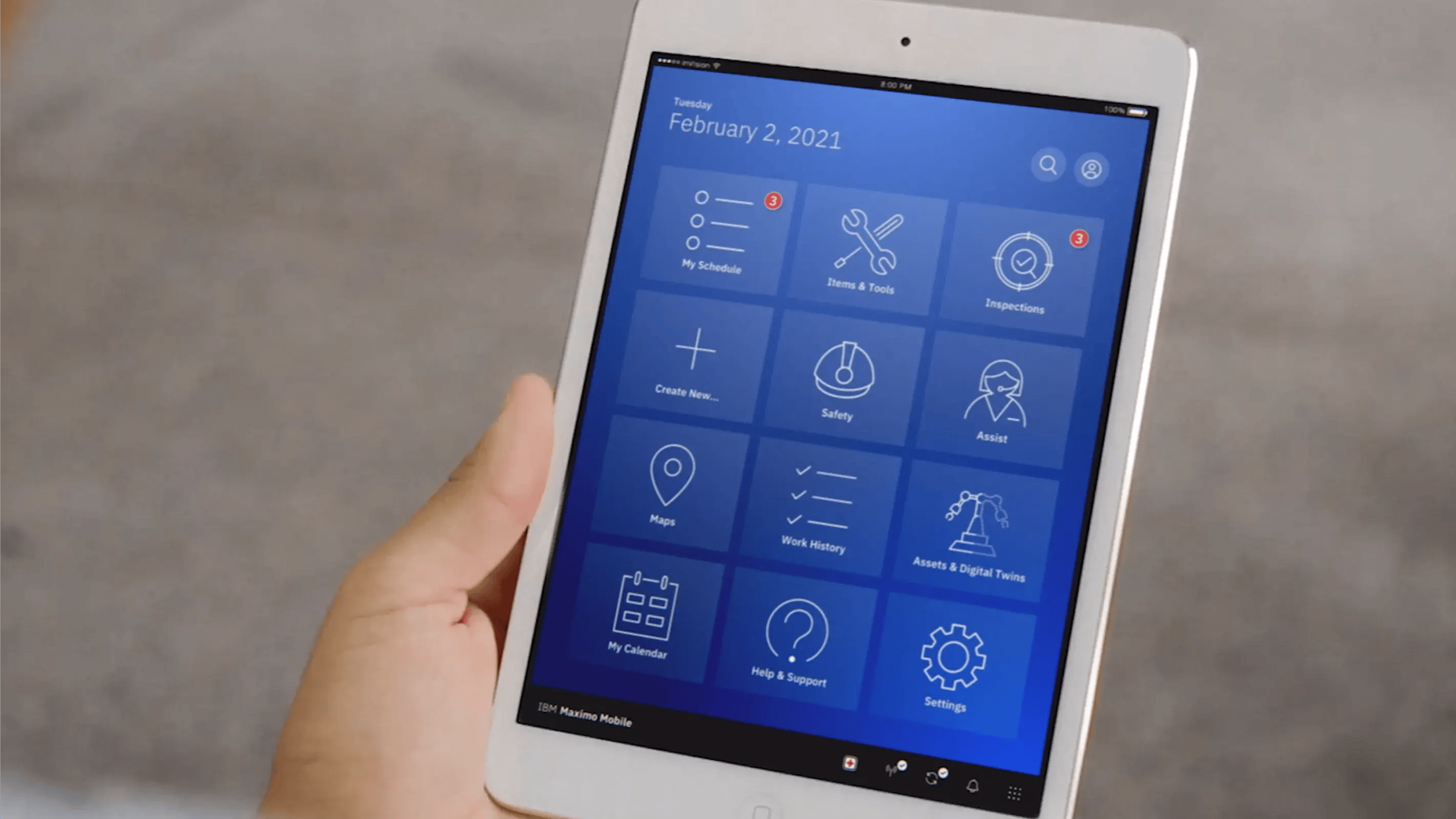
The industrial platforms field operations depend on, including IBM Maximo, SAP Plant Maintenance and a wide range of SCADA visualization tools, run on iPadOS, with Maximo Mobile available directly from the App Store. Where a vendor ships a maintained iPadOS client, teams get a supported mobile interface on hardware with the screen area to display it properly.
Support lifecycle deserves closer reading than it usually gets, because the headline numbers point in different directions. Samsung's enterprise edition tablets, which several Zone 1 units are built on, carry a published commitment of eight OS generations with security patches into 2032. Apple publishes no guaranteed support length for iPad, though in practice iPads have received major iPadOS upgrades for roughly six to seven years, with security updates continuing to close to nine. The comparison is therefore less about duration and more about what a supplier will state in writing, which matters when a Zone 1 fleet stays in service long enough that falling out of support triggers recertification, retraining and replacement costs.
The cover the tablet sits in belongs in the same calculation. Because the Xshielder cover is replaceable, the iPad can be taken out at the end of its service life for trade-in or resale rather than retired inside the housing, which avoids a forced replacement cycle and recovers some of the original spend.
Where the dedicated intrinsically safe tablet still wins
Two areas favour purpose-built hardware, and both are worth checking before any consumer-tablet route gets serious consideration.
The first is environmental range. Dedicated Zone 1 tablets are typically rated from -20°C to +55°C. Apple rates the 11-inch iPad Pro for operation between 0°C and 35°C ambient. For an indoor pharmaceutical plant that gap is academic, and for a North Sea platform in February it is decisive.
The second is spares and logistics. Established Zone 1 tablet vendors have been shipping into this market for years, with predictable lead times and a spares pool behind them, which carries real weight for offshore sites where a replacement unit has to reach a platform quickly. Any newer route into Zone 1 should be assessed on the same terms.
Specification comparison
| Consideration | Typical dedicated Zone 1 IS tablet | 11-inch iPad Pro M5 in a certified enclosure |
|---|---|---|
| Display | 8-inch LCD, around 600 nits | 11-inch Tandem OLED, 1,600 nits peak, 120Hz |
| Processor | Mid-range Android SoC | Apple M5, 10-core GPU, 9 or 10-core CPU |
| Authentication | PIN or fingerprint | Face ID, though not through face-covering PPE |
| Operating temperature | Typically -20°C to +55°C | Typically -20°C to +45°C |
| OS ecosystem | Android under Samsung Knox | iPadOS, widely familiar to staff |
| Software support | Published commitment, up to 8 OS generations | No published commitment, historically 6 to 7 years of upgrades |
| AR and LiDAR | Rarely available | Native LiDAR scanner with 12MP Pro camera |
| Hazardous area rating | Zone 1 built in | Zone 1 via the enclosure and device as one system |
Field Use Cases: How the iPad Performs in Zone 1
Certification gets a device into the environment. What it does once it is there depends on the applications running on it and whether the hardware can run them properly. The workflows below are where an 11-inch iPad Pro M5 delivers a meaningful operational improvement over legacy field devices, and each links to a dedicated guide for teams that want the full detail.
1. Field device parameterization and configuration
Parameterizing a control valve positioner or a multi-variable pressure transmitter is one of the most cognitively demanding tasks a field technician performs. These jobs involve complex digital handshakes over HART, Foundation Fieldbus or Profibus-PA, managed through software environments such as Electronic Device Description Language (EDDL) that render detailed diagnostic curves, alarm logs and nested parameter structures.
Legacy field devices introduce lag at exactly the wrong moment, compress UI elements that should be distinct, and force the kind of keyhole navigation that makes misconfiguration more likely. The M5 chip loads EDDL files instantly, and the 11-inch display shows the full diagnostic interface without scrolling.
Apps such as DevCom run on iPadOS and support complete HART device configurations over a Bluetooth Low Energy modem, including guided calibration procedures and remote configuration for instruments in areas too hazardous for direct physical connection. Field markups sync straight to Enterprise Asset Management systems, which keeps the as-configured state of the plant accurate in the central database.
Read the full guide: Intrinsically safe iPads for safe, efficient Zone 1 parameterization. Covers EDDL workflows, HART configuration apps, screen real estate as a safety requirement, and the ROI case for modern field technology.
2. Digital twin visualization and live analytics
Digital twins have moved out of the control room. Operations teams are bringing high-fidelity 3D models into the field so that operators can work with a virtual mirror of physical assets in real time. The hardware demand is substantial, combining large CAD files, real-time sensor overlays, historical trend analysis and predictive alert processing, all running at once on a device held in one hand.
Legacy intrinsically safe devices were not built for this workload. They stutter on large models, add processing delays that turn real-time data into recent data, and compress the interface to the point where pattern recognition, one of the core analytical tasks a twin exists to support, becomes difficult.
The M5 chip handles these environments without noticeable delay, and the 11-inch display gives trend data and live asset models enough room to be read side by side. The Pro camera system in the iPad Pro pairs LiDAR with a 12MP sensor and 4K video, so augmented reality overlays can be anchored to physical assets and inspection evidence captured on the same device, surfacing live twin data onto the equipment the operator is looking at without manual navigation to the relevant record.
Read the full guide: Visualizing industrial sites with digital twins on IS tablets. Covers the processing demands of twin environments, AR overlays, trend analysis and situational awareness in hazardous zones.
3. Navigating complex engineering drawings
P&IDs, electrical schematics and plant layout drawings are topological networks, where meaning is defined by the spatial relationship between components. A technician reading one is running a continuous mental simulation of system behavior, and that simulation only holds together when the drawing can be seen at a scale that preserves its spatial logic.
On an 8-inch screen the desert fog problem is unavoidable. Zoom in to read a tag, lose the surrounding context, zoom back out to reorient, and pay for every cycle in working memory. On an 11-inch Tandem OLED display a full P&ID section is legible without constant navigation, so a technician can trace a flow path from source to destination and verify a safety cross-reference without losing their place.
Annotation matters too. Field redlines and as-built markups feed directly into the integrity of the engineering database that all subsequent maintenance and regulatory review depends on. The Apple Pencil gives technicians pen-level precision for field markup, placed correctly, in the right spatial context, and synced back to office engineering systems.
Read the full guide: Navigating complex engineering drawings on an intrinsically safe iPad. Covers the cognitive trap of small-screen navigation, precision redlining and as-built documentation integrity.
4. Optimising work execution in Zone 1
Most work order, inspection and reporting systems were designed for desktop environments, and moving them to mobile does not automatically make them field-friendly. When the hardware is poorly matched to the task, for example a small screen for a multi-section form, a slow device for an EAM platform, or a glove-hostile authentication method, the digital workflow breaks down at the point of execution.
The result is predictable. Technicians complete the physical task and record it later, later becomes end of shift, and end of shift becomes reconstruction from memory. Under ALCOA+ data integrity principles that is no longer a contemporaneous, original record, and in regulated industries that becomes a problem at the point of audit.
An 11-inch iPad Pro changes the economics of field recording. The full task structure is visible at once, Face ID authenticates without touchscreen input, the M5 keeps EAM platforms responsive, and Permit to Work documents can be read in full without scrolling through disconnected sections. The hardware makes contemporaneous recording the path of least resistance.
Read the full guide: Optimising work execution in Zone 1 with an intrinsically safe iPad. Covers ALCOA+ compliance, Permit to Work workflows, glove-compatible input and the reality of field authentication under time pressure.
5. Field collaboration and crew situational awareness
Safety in hazardous industrial environments is a distributed property of the team as much as the individual. On an offshore platform or in a chemical processing plant, the quality of operational decisions depends on how well a crew aligns their understanding before work begins and during it. Misaligned mental models, where crew members work from different assumptions about system state, are a documented precursor to industrial incidents.
A shared visual reference addresses this in a way verbal communication cannot. When a supervisor holds up an iPad showing the current P&ID, the isolation boundary or the live process state, knowledge that existed in one person's head becomes visible and verifiable to the whole team. On a smartphone that information tends to stay with the individual, because a small screen is instinctively treated as personal territory while others wait for one person to interpret it.
At 11 inches the display is large enough for a crew to gather around and review a work order together. Pointing at a screen and saying "that valve" while both parties see the same drawing is faster, more precise and immediately confirmable compared with verbal spatial description. In process isolations and other high-consequence tasks, that communication efficiency reduces the conditions that allow errors to occur.
Read the full guide: Facilitating field collaboration on intrinsically safe iPads and tablets. Covers shared situational awareness, Crew Resource Management principles and how tablet form factor changes team communication dynamics.
What to Require of a Zone 1 Tablet Enclosure
Everything above holds only if the enclosure enabling Zone 1 entry preserves the capabilities that justified choosing the device. This is where hazardous area cases most often disappoint. Protective housing that obscures the display, adds significant weight, blocks Face ID or dulls touch response turns a premium field device back into a compromised one, and a buyer who has not written these requirements into the specification tends to discover the problem after rollout.
The requirements below are the ones worth putting in writing before any enclosure gets serious consideration. They apply whether the housing comes from the tablet manufacturer or a third party, and our guide to the six features an intrinsically safe tablet or iPad needs for Zone 1 expands on each. They are also the constraints the Xshielder iPad Pro 11 inch was designed around.
Certification that names your exact configuration
The certificate should name the specific tablet model the enclosure is rated to house, not a family or a size class. Ask for the certificate number and the notified body rather than a compliance statement, confirm which zones it covers including dust zones 21 and 22 if relevant, and check whether it restricts charging, battery handling or accessory use inside the hazardous area. Certification documentation should be available in a form that supports a compliance audit.
Optical and touch performance preserved
A 1,600 nit display behind the wrong window is no longer a 1,600 nit display. Require that the enclosure introduces no measurable optical degradation, that touch response is maintained across the full screen area rather than the center, and that stylus input still works, since field redlining on engineering drawings depends on pen-level precision that a thick or diffusing window will destroy.
Authentication that survives the housing
Face ID depends on an infrared sensor array with a specific field of view, so an enclosure has to accommodate it deliberately rather than leave a gap and hope. Require demonstrated authentication through the housing, tested in the PPE your crews actually wear. An enclosure that forces a fallback to passcode entry hands back the glove-compatible authentication advantage that made the device attractive in the first place.
Weight and balance over a full shift
Legacy intrinsically safe devices are heavy, partly as a consequence of their construction and partly because weight has historically been a lower-priority design consideration for industrial hardware. Over a long shift, hardware fatigue is a real factor in whether a device gets used consistently or left at the start of the shift and collected at the end. Specify a target weight for the complete assembly, and test carrying it across a site rather than holding it in a meeting room.
Group readability retained
If the reason for choosing an 11-inch device was shared viewing during crew briefings, check the enclosure at an angle rather than head on. Bezels, recessed windows and anti-glare treatments that read well for a single user directly in front of the screen can cut viewing angles enough to break the group use case the purchase was built on.
Industry Applications
Oil and gas, upstream and downstream
Upstream operations involve some of the most demanding Zone 1 environments, including offshore platforms, wellhead areas and gathering facilities where volatile hydrocarbons are continuously present. Technicians there perform complex instrumentation tasks, review large volumes of engineering documentation and depend on accurate, contemporaneous record-keeping for regulatory compliance.
Downstream operations across refineries, terminals and petrochemical plants add the complexity of large-scale process systems, where P&ID navigation and digital twin integration sit close to the center of operational efficiency.
Chemical processing
Chemical plants operate Zone 1 areas across multiple process units, with technicians responsible for parameterizing instruments, reviewing process documentation and executing structured work orders under regulatory frameworks that demand data integrity at the point of capture. The ALCOA+ requirements governing these industries line up closely with what a fast, large-screen, glove-friendly tablet brings to the field.
Offshore and marine
Offshore environments add challenges beyond the basic Zone 1 requirements, including vibration, spray, restricted access areas and the logistical difficulty of getting replacement hardware to a platform quickly. Ambient temperature deserves particular attention here, since a device rated only to freezing will struggle through a North Sea winter regardless of how capable it is otherwise.
Pharmaceutical manufacturing
Pharmaceutical field operations sit under similarly strict regulatory frameworks, with ALCOA+ principles governing data integrity much as they do in oil and gas. Zone 1 areas typically cluster around solvent handling, coating and extraction processes, and they benefit from the same combination of screen real estate, processing power and contemporaneous recording capability that works in other regulated industries.
Deploying an iPad in Zone 1: Practical Guidance
Fleet planning and certification
Zone 1 device deployment is not a quick procurement cycle. Once a device is certified and configured it stays in the field for years, so the choice commits the organization to a software ecosystem, a support lifecycle and a user experience as much as to a piece of hardware.
For most operations the practical fleet question is whether to run a mixed device strategy, with intrinsically safe smartphones for high-mobility, single-person tasks and tablets for complex multi-field workflows, engineering document review and crew briefings. Both halves of that strategy can now run on Apple hardware. The Xshielder iPad Pro 11 inch covers the tablet side, and Xshielder's explosion-proof covers for the iPhone 17 Pro Max put current Apple phone hardware, including Face ID and the latest camera system, into Zone 1 and Zone 2 areas, which lets teams standardize on one ecosystem across the crew and keep training and MDM overhead in one place.
Configuration and application setup
Because the iPad Pro runs standard iPadOS, application setup follows normal enterprise mobile device management workflows. Apps can be deployed through Apple Business Manager, corporate profiles applied and access controls managed through the same MDM tooling the organization already uses for its broader iOS fleet, which avoids the bespoke configuration work that often comes with proprietary IS hardware.
Industrial platforms including IBM Maximo and SAP PM have established iPadOS deployment paths, and DevCom for HART configuration, various SCADA visualization tools and document management systems are available through the App Store and familiar to the IT teams that will support the deployment.
Training considerations
The main training advantage is that most technicians need very little of it. iPadOS is the most widely used tablet operating system in the world, and its navigation patterns, authentication methods and application structures are already familiar to much of the workforce before they pick up the device for the first time.
Training then concentrates on the industrial applications themselves, meaning the EAM platforms, configuration tools and documentation systems the device will run. That shortens time to value in a deployment and reduces the training overhead that often delays return on investment for Zone 1 technology projects.
Total cost of ownership
Comparing an enclosed iPad Pro with a dedicated IS tablet should account for more than the initial hardware price. The relevant frame is total cost of ownership across the deployment window, covering hardware, enclosure, application licensing, training, spares and the cost of forced replacement if a device falls out of software support mid-deployment.
Residual value belongs on the same sheet and is usually left off it. A replaceable cover means the iPad itself can be traded in or resold when the fleet is refreshed, so part of the original spend comes back rather than being written off with a sealed proprietary unit.
Ask any supplier to state the software support end date in the quotation rather than in conversation. A Zone 1 fleet that outlives its support window generates recertification, retraining and replacement costs that rarely appear in the original business case.
Bringing Certified Apple Hardware Into Your Hazardous Areas
If you are building a Zone 1 mobility strategy, both halves of the fleet are available now. The Xshielder iPad Pro 11 inch is the first iPad Pro built for hazardous areas, bringing a full-size premium display, desktop-class processing and a Pro camera system with LiDAR into Zone 1 operations. Alongside it, Xshielder manufactures ATEX certified explosion-proof covers that take the latest iPhone hardware into Zone 1 and Zone 2 areas without giving up Face ID, camera quality or the iOS apps your teams already use.
Talk to Xshielder about your hazardous area deployment or browse the full product range to see which configuration fits your sites.
Frequently Asked Questions
Can you use a standard iPad in a Zone 1 hazardous area?
No. An iPad carries no hazardous area rating on its own and represents a genuine ignition risk in Zone 1, so it can only be used inside an enclosure certified for that zone.
Is the 11-inch iPad Pro M5 intrinsically safe?
No, the iPad Pro is not intrinsically safe and holds no ATEX rating by itself. Hazardous area use depends on a certified enclosure such as the Xshielder iPad Pro 11 inch, and the resulting rating applies to the enclosure and the tablet together as one assessed system.
What is the difference between an intrinsically safe tablet and an explosion-proof tablet?
An intrinsically safe tablet limits the internal electrical and thermal energy so it is too low to ignite the atmosphere, while an explosion-proof design contains any ignition inside a housing built to stop flame reaching the surrounding atmosphere. Both are recognized routes to Zone 1 compliance.
Does Face ID work with gloves and PPE in Zone 1?
Face ID works normally with gloves because it needs no touchscreen input, but on iPad it must see the mouth and nose, so respirators and similar face-covering PPE require a passcode fallback.
What screen size do you need to read P&IDs on a hazardous area tablet?
Zone 1 tablets are generally 8-inch, which forces repeated zooming on complex drawings and costs working memory each cycle. Where drawing navigation is a core workflow, an 11-inch class display is worth specifying.